Virtual Coworking and Shared Timers: Finding Quiet Focus in an Age of Cluttered Screens

Working remotely, studying for exams, or writing and coding for hours can often feel isolating. Yet hopping into a standard video call can feel demanding—keeping a camera on, managing lighting, and worrying about background noise introduces a subtle social fatigue.
This balance between wanting companionship and needing privacy has driven the popularity of virtual co-working platforms, such as the global productivity platform LifeAt, and beloved regional study-call apps like Japan's mocri (which concluded operations in 2024).
In this article, we look at what these platforms taught us about shared productivity, evaluate the difference between "adding features" versus "designing by subtraction," and explain the design philosophy behind keensense's Room Pro tier.
1. The Two Approaches: LifeAt and mocri
Services designed for shared productivity generally follow one of two paths: comprehensive dashboards or lightweight presence.
LifeAt: The All-in-One Virtual Workspace
LifeAt (lifeat.io) aggregates looping video backgrounds of coffee shops, global cities, and natural landscapes, pairing them with Spotify playlists, Pomodoro timers, to-do lists, and note-taking scratchpads in a single dashboard.
- Strengths: It delivers an inspiring desk setup with ambient visuals and all essential productivity tools readily accessible.
- Considerations: With multiple widget panels on screen, the display can become dense. For individuals who want to keep their eyes strictly on their code or writing, a busy screen and background CPU/RAM usage can occasionally become a distraction.
mocri: Spontaneous Audio Calls for Creators
mocri was an immensely popular mobile app among digital artists and writers in Japan, enabling casual voice calls and 25-minute focus rooms without prior scheduling.
- Strengths: Its casual "jump-in" audio rooms and synchronized focus timers helped thousands of creative workers maintain regular habits without video fatigue.
- The Challenge of Continuity: When the service shut down in March 2024, users lamented the loss of their digital home. Maintaining mobile applications, complex social follower graphs, and notification servers requires significant operational overhead, showing how difficult it is to sustain heavy social infrastructure over time.
2. What Do We Truly Need in a Focus Space?
When analyzing sustainable focus, the most valuable design choice is often what a tool decides not to include.
Here are LifeAt, mocri and keensense side by side, split into free and paid. Check each official page for the latest LifeAt pricing and features (as of November 2026; mocri has closed, so its column shows how it was at the end).
Free
| Item | LifeAt (free) | mocri (before closing) | keensense (free) |
|---|---|---|---|
| Status | Available | Closed March 2024 | Available |
| Visuals | Live-action video loops + control panels | App screen (friends' status list) | Real-time 3D nature (fire, stars, forest) |
| Audio | External music (Spotify link) | Work calls | Ambient sound + voice (up to 45 min per call) |
| Timer | Personal Pomodoro | 25/5 focus rooms | None (synced timer is paid) |
| Joining | Account sign-up | App install + friends | No sign-up, just open a URL (10 people per room) |
Paid
| Item | LifeAt (Pro) | mocri | keensense Room Pro |
|---|---|---|---|
| Price | Monthly / annual plans (see official page) | — | JPY 480 per month |
| Call length | — | — | Unlimited |
| Synced timer | Personal | Shared focus rooms | Whole room, with meditation bell |
| People | — | — | Up to 30 |
| Room protection | — | — | Passcode lock + host controls |
| Who pays | Each person subscribes | — | One host on Pro covers everyone in the room |
"—" marks items not confirmed for this article; nothing is guessed.
Quiet Presence Over Video Demands
Cameras enforce posture and environmental awareness. In contrast, knowing that someone else is working alongside you through subtle geometric avatars, gentle nature acoustics, or an occasional quiet voice note creates companionship without emotional drain.
Frictionless Access Without Accounts
Asking collaborators to register accounts, confirm emails, and add usernames before a study session creates unnecessary resistance. A lightweight web-based room accessible directly via URL allows people to assemble instantly and depart simply by closing their browser tab.
3. The Architecture of keensense Room Pro
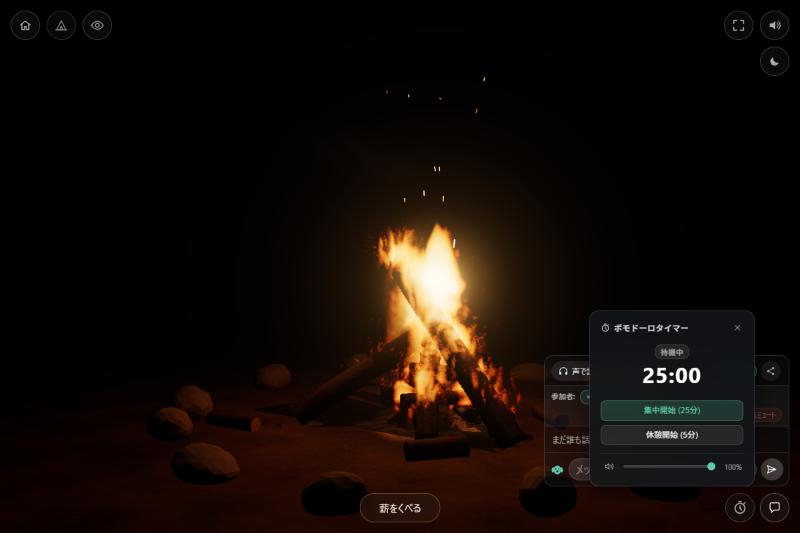
keensense was built to render living natural phenomena—such as campfires, starlight, coastal waves, and rainfall—entirely within standard web browsers using real-time mathematics and spatial acoustics. It intentionally omits advertisements and crowded controls.
The Room Pro tier builds upon this foundation, offering specific enhancements for remote coworkers and study groups:
- Unlimited Voice Chat: Removes the 45-minute complimentary limit, supporting open-ended coworking and quiet reading sessions.
- Synchronized Pomodoro Timer: When the host starts a 25-minute focus or 5-minute break period, all participants' clocks count down together in real time.
- Meditation Bell with Local Volume Control: A soothing singing bowl tone sounds at intervals. Each user can adjust the bell volume (0% to 100%) or mute it locally.
- Room Passcodes: Protect your focus session with a simple passcode for private teams or trusted friends.
- Single-Host Coverage: Only the room organizer needs a Pro license; all invited guests automatically share the benefits without paying or signing up.
4. Choosing the Right Setting for Your Rhythm
Different tasks call for different environments. On days when you need high-tempo motivation, curated music, and rich checklist dashboards, platforms like LifeAt offer a vibrant digital hub.
On days when you want to minimize screen clutter, lower sensory load, and quietly move through deep work alongside peers, a minimal ambient space powered by natural sounds and synchronized interval bells provides a calmer alternative.
Stepping back from excessive notifications and surrounding yourself with the steady cadence of nature can make even the longest workdays feel grounded and restorative.