Zoom, Google Meet or keensense for Focus Sessions and Team Hangouts? Free vs. Paid Comparison

When you run a quiet "work together" session or a casual hangout for a remote team, Zoom and Google Meet are the obvious first picks. Yet some people find that camera-based calls turn everything into a meeting, or that the call simply ends when a time limit hits.
This article compares Zoom, Google Meet and keensense, a browser-based room with natural scenery, for free use and for paid use. We state what each does well and what it cannot do, up front.
Zoom and Google Meet are meeting tools, with screen sharing and recording. keensense is a room where people share the same scenery with voice and text chat; it is not a meeting tool. They are not like-for-like, so read this as a way to decide which one fits today's gathering, not which is "better".
The Zoom and Google Meet figures were checked on November 8, 2026 against the official Zoom pricing page and the Google Meet help page. Prices and limits change, so please check the official pages before you decide.
1. Free use
Zoom's free plan (Basic) allows 40 minutes per meeting. Google Meet, with a personal Google account, allows 60 minutes for meetings of three or more people (one-on-one calls can last up to 24 hours).
| Item | Zoom (free) | Google Meet (free) | keensense (free) |
|---|---|---|---|
| Length of one call | Up to 40 min per meeting | Up to 60 min for 3+ people (1:1 up to 24 h; chime at 50 min) | Up to 45 min (warning at 5 min left) |
| People at once | Up to 100 | Up to 100 | Up to 10 per room |
| Getting in | Joining needs no account; hosting needs one | A Google account is required | No membership sign-up or login. Just open a URL |
| Camera | Available | Available | None (voice and text only) |
| Screen sharing / recording | Yes (free recording is local only) | Yes (recording depends on availability and plan) | No |
| Background | A grid of faces and names | A grid of faces and names | Campfire, stars, forest and other scenery with ambient sound |
| Focus timer | None (use a separate timer) | None (use a separate timer) | None (the synced timer is paid) |
For a large meeting, Zoom or Google Meet suits you even on the free plan. For a small group that wants to skip the camera and join with no preparation, keensense fits.
2. Paid use
Zoom and Google Meet have many paid plans, so we only list the broad differences confirmed on the official pages. keensense Room Pro costs JPY 480 per month. No membership sign-up or login is needed; after payment a key is stored on your device.
| Item | Zoom (paid) | Google Meet (paid) | keensense Room Pro |
|---|---|---|---|
| Length of one call | Pro: up to 30 hours per meeting | Workspace Individual: up to 24 hours | Unlimited |
| People at once | Pro 100, Business 300, Enterprise 500+ | 100 to 1,000 depending on the Workspace edition | Up to 30 |
| Price | Pro: USD 16.99 per user per month billed monthly (USD 14.16 billed annually) | See official page | JPY 480 / month |
| Protecting the room | Passcode, waiting room | Host controls (see the official help) | Passcode lock |
| Host controls | Host controls available (see official page) | Host controls available (see official page) | Mute everyone, remove people |
| Synced timer | None | None | Room-wide Pomodoro (25 min focus, 5 min break) |
| Sound control | Call audio only | Call audio only | Per-layer scenery volume, per-person voice volume, automatic ducking while others speak |
| Who pays | The host | The host | If one host is on Pro, everyone in the room can use it |
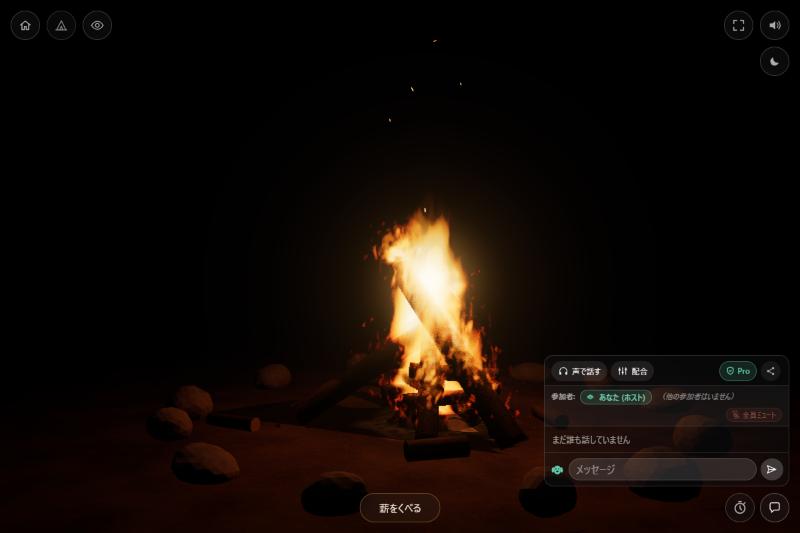
3. For focus sessions ("mokumoku" sessions)
A focus session runs like this: someone says "let's start", everyone works quietly, and the group chats briefly at each break. What matters is that everyone gets the same break time, and that silence does not feel awkward.
- Zoom / Google Meet: You can share screens to show what you are working on. But you need a separate timer, and a grid of faces can make silence feel uncomfortable.
- keensense: The scenery fills the screen, so silence is easy. With Room Pro, when the host starts a focus period the countdown runs on everyone's screen at once, and a bell rings at the end.
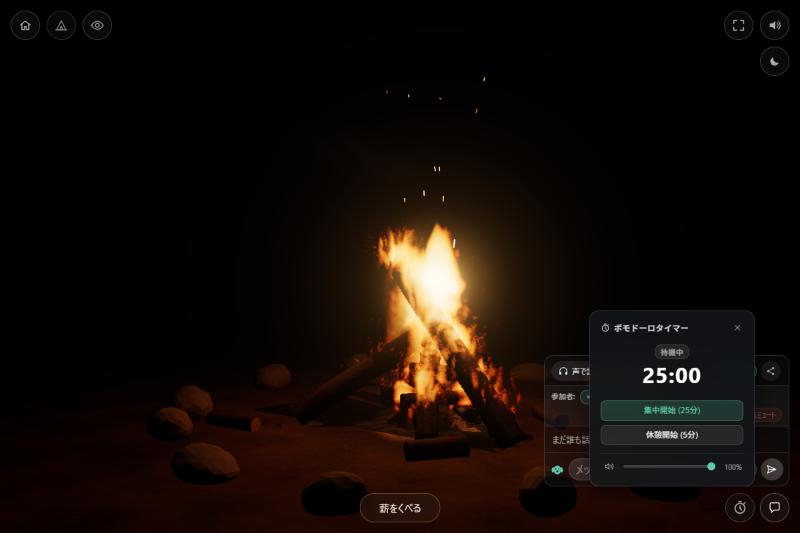
More on the timer idea in our article on online creative sprint sessions.
4. For team hangouts and casual chat
Remote teams often lose their small talk. Here too, the tools differ in what they can do.
- Zoom / Google Meet: They give you ways to run the session: breakout rooms in Zoom (also on its free plan), games through screen sharing, recording. They suit icebreakers and workshops.
- keensense: There are no facilitation features (games, polls, group splitting). It is a "just be there" room: people gather around the same campfire and talk by voice or text if they want to. Without a camera, the barrier to chatting is lower. A standing room with a passcode (Room Pro) lets people drop in even when there is no agenda.
keensense has no screen sharing, recording or camera. If you need meeting records, or want to show materials while you talk, choose Zoom or Google Meet.
5. Who suits which
| Situation | Zoom | Google Meet | keensense |
|---|---|---|---|
| Meetings or webinars over 10 people | Suits | Suits | Up to 30 with Pro; not for large groups |
| Discussing materials on screen | Suits | Suits | Does not suit (no screen sharing) |
| Icebreakers and group splitting | Suits | Suits | Does not suit (no facilitation features) |
| Working quietly without a camera | Works | Works | Suits |
| Gathering with no sign-up, login or setup | Some effort | Needs a Google account | Suits |
| Keeping everyone's breaks in sync | Needs a separate timer | Needs a separate timer | Suits (Pro) |
| A standing room to drop into | Works | Works | Suits (Pro) |
6. Summary
For gatherings that need many people, materials or facilitation, use Zoom or Google Meet. For a quiet room where you can just be present without a camera, and silence is fine, try keensense. Using both is realistic: Meet for the weekly meeting, a campfire room for daily focus time.
You can try it free: up to 10 people and 45 minutes per call, with no membership sign-up, no login and no payment. Just share the URL.